


qikify Collection Slideshow
Esittelykuvagalleria


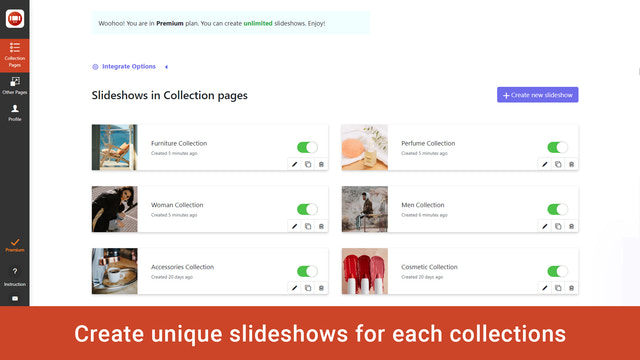


qikify Collection Slideshow – Esittele parhaita tuotekuviasi upeissa kuvadiaesityksissä
Luo parempia ostoskokemuksia bannerikaruselleilla, jotka ilahduttavat asiakkaitasi ja kasvattavat myyntiäsi. Karusellit voidaan määrittää kaikille kaupan sivuille. Tämän ansiosta käyttöönotto on nopeaa ja helppoa. Jokaisella karusellilla on oma tarkoituksensa, kuten tuotteiden ja kokoelmien esittely.
- Lisää linkki kokoelman diaesityksen kuvakaruselliin
- Diaesityksen kuvakaruselli Shopify-teemojen bannerille
- Bannerikokoelman diaesityksen kuvakaruselli kaikille sivuille
Sisältää automaattisesti käännettyä tekstiä
Kielet
Englanti
Tätä sovellusta ei ole käännetty kielelle Suomi
Luokat
Kuvan optimointi
Joukkomuokkaus
Galleriatyypit
Mukautukset
Hinnoittelu
Valitse yrityksellesi parhaiten sopiva sopimus.
Aina ilmainen
Ilmainen
Ominaisuudet
- 1 diaesitys
- 2 diaa / diaesitys
- Lisää kuvan URL-osoite
- Lisää kaikkiin tai valittuihin kokoelmiin
- Mukauta tyyliä
- Responsiivinen
- Ei vesileimaa
- Tuki
Basic
$4.99 /kuukausi
tai $47.87/vuosi ja säästä 20 %
+20 % Shopify Plus -kaupoille
Ominaisuudet
- Ilmainen kehityskaupoille
- Kaikki Free-sopimuksen ominaisuudet
- 6 diaesitystä
- 3 diaa / diaesitys
- Lataa kuva
7 päivän maksuton kokeilu
Premium
$9.99 /kuukausi
tai $95.87/vuosi ja säästä 20 %
+20 % Shopify Plus -kaupoille
Ominaisuudet
- Ilmainen kehityskaupoille
- Kaikki Basic-sopimuksen ominaisuudet
- Rajoittamattomasti diaesityksiä
- Rajoittamattomasti dioja
7 päivän maksuton kokeilu
Sisältää automaattisesti käännettyä tekstiä
Kaikki maksut laskutetaan valuutassa USD. Toistuvat ja käyttöperusteiset maksut laskutetaan 30 päivän välein.
Arvostelut (1)
-
0 % arvioista on 5 tähteä
-
0 % arvioista on 4 tähteä
- 100 % arvioista on 3 tähteä
-
0 % arvioista on 2 tähteä
-
0 % arvioista on 1 tähteä
downloaded the app so I could add a collection slideshow on my homepage. The 'free' version wont let me upload any photos to my collections, making the whole thing useless. Maybe the paid version works better. Didnt get any further.
Hi there,
In Free plan, you can upload an image to get its URL in your Shopify admin / Settings / Files / Upload file. Once the image is uploaded, you will get a URL alongside its entry > Copy that URL and paste into "Background image" field.
If you want to upload directly image to our app, you will need to upgrade to higher plan. Because the image is uploaded to our sever, so it will be a paid feature. Hope you can understand for us.
If you need any other assistance, feel free to contact us at support.qikify.com
Tuki
Sovellustuen tarjoaa Qikify.
Resurssit
Kehittäjä
Lanseerattu
16. syyskuu 2019

